
Smiota logo
About
Our Team
Compliance & Certifications
Our Partners
Work with Us
Platform
Package Lockers
Standard Package Lockers
Day Use Lockers
Outdoor Lockers
Asset Management Lockers
Smart Package Rooms
Solutions
Retail
Multifamily
Universities & Campus
Workplaces
Libraries
Government
Healthcare
Fitness & Wellness
Software
Mailroom
Resources
Blogs
Legal
Information Security Policy
Privacy Notice
EULA
About
Our Team
Compliance & Certifications
Our Partners
Work with Us
Technology / Platform
Package Lockers
Standard Package Lockers
Day Use Lockers
Outdoor Lockers
Asset Management Lockers
Smart Package Rooms
Solutions
Retail
Multifamily
Universities & Campus
Workplaces
Libraries
Government
Healthcare
Fitness & Wellness
Software
Mailroom
Resources
Blogs
Legal
Information Security Policy
Privacy Notice
EULA
Contact
Get in Touch

How Building Guests Can Use Smiota’s Smart Lockers for Package Delivery & Securing Personal Items

  • Published on
  • January 7, 2020

Occasionally, the need may arise for visitors of your business or building to use Smiota’s package lockers. They may be looking for a safe place to drop off deliveries or a means of temporarily securing personal items. 
Rather than entering these visitors into the system, they can simply register as guest users and gain temporary access to the lockers. And at the end of each day, the system will purge their data to protect their privacy. 
Here’s how guests can quickly and easily borrow Smiota’s lockers.

Guest workflow

How to deposit packages into Smiota Urban PoDs
Using the Smiota Urban PoD touchscreen, guests can secure items in a locker within minutes.

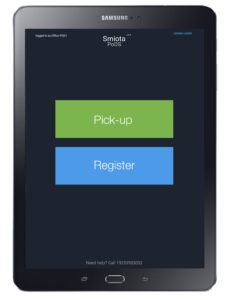
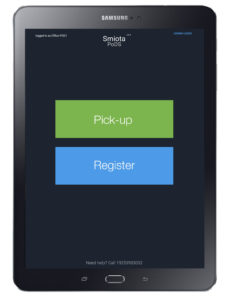
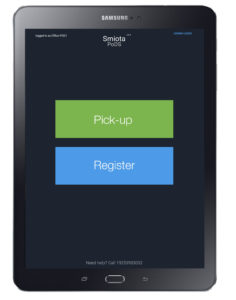
  1. Tap on “Register.”
  2. Enter the first name, last name, email address, and mobile number. Then tap on “Submit.”
  3. A one-time user registration passcode (valid for 90 seconds) will be sent using the contact information provided.
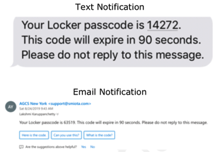
    Email and Text Notification
  4. Enter the one-time user registration passcode.
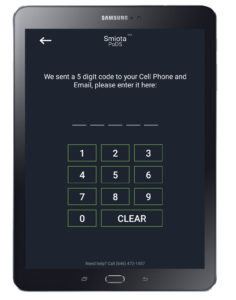
    Deposit Items Step 4
  5. An available locker door will open. Deposit items in the locker and close the door.
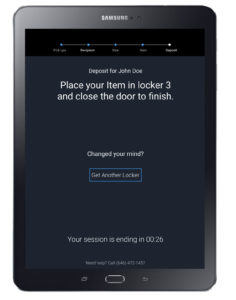
  6. A notification is sent to your email address or cell phone — the notification includes a passcode and QR code to access the locker for the remainder of the day.

How to deposit multiple items into Smiota Urban PoDs
If there are additional items to deposit, continue using the Smiota Urban PoD touchscreen.

  1. Tap on “Register.”
    Deposit Multiple Items Step 1
  2. Enter the previously provided passcode or scan the QR code to access the locker.
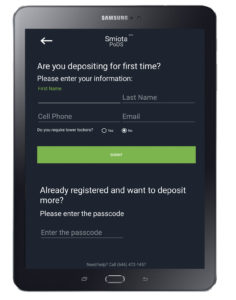
    Deposit Multiple Items Step 2
  3. Your assigned locker will open. Deposit the items in the locker and close the door.
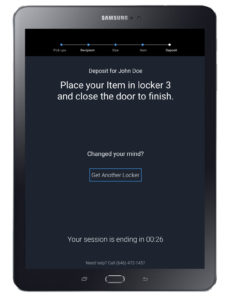
    Deposit Multiple Items Step 3
  4. Continue these steps until all items have been deposited.

Pick-up workflow

Using the locker touchscreen and the provided passcode, users can retrieve items at their convenience.
How to pick up packages from Smiota Urban PoDs

  1. Tap on “Pick-up.”
    Pickup Items Step 1
  2. Enter the passcode or scan the QR code that was previously issued.
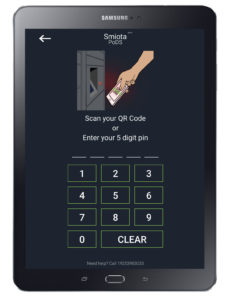
    Pickup Items Step 2
  3. Pick-up items and close the locker door.
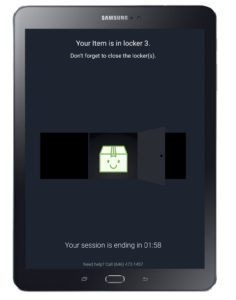
    Pickup Items Step 3

Looking for a secure package delivery solution that benefits your staff, tenants, and guests? Contact us today to learn how Smiota’s smart lockers can help.

Share:

More Posts

Smart Lockers for Apartments: Benefits, ROI, and Implementation Guide

April 9, 2026

What Are Smart Package Lockers? The Complete 2026 Guide

April 9, 2026

More Than Storage: How Smart Lockers Are Strengthening Campus Security 

April 1, 2026

From Reservation to Retrieval: The Journey of a Book Through a Smart Locker System 

March 26, 2026

Categories

  • Airports
  • Asset Management
  • Case Studies
  • Colleges and Universities
  • Commercial Building Development
  • Corporate Facilities Management
  • Corporate News
  • Correctional Facilities
  • Fitness Centres
  • Food lockers
  • Government Facilities
  • Indoor Lockers
  • Installations
  • Libraries
  • Mailroom Software
  • Military & Airforce
  • Multifamily Building Development
  • Multifamily Property Management
  • Outdoor Lockers
  • Package Management Systems
  • Package Theft
  • Parcel Lockers
  • Retail
  • Sports and fitness centres
  • Student Housing Management
  • Supply Chain Management
  • Temperature-controlled Lockers
  • Warehouse Management

Recent Posts

Smart Locker Security: How They Protect Packages 24/7

Smart Lockers for Apartments: Benefits, ROI, and Implementation Guide

What Are Smart Package Lockers? The Complete 2026 Guide

View All
Smiota logo
Smart locker solutions powered by advanced IoT technology. Transforming how organizations manage their spaces.

Solutions

  • Retail
  • Multifamily
  • Universities & Campuses
  • Workplaces
  • Libraries
  • Government
  • Healthcare
  • Fitness & Wellness

Products & Automation

  • Standard Package Lockers
  • Day Use Lockers
  • Outdoor Lockers
  • Asset Management Lockers
  • Smart Package Rooms
  • Mailroom Software

Company

  • About
  • Partners
  • Careers
  • EULA
  • Privacy Notice

© 2026 SMIOTA. All rights reserved.

Facebook-square X-twitter Linkedin
script>
Scroll to Top